Lesson 6: Simple Linear Regression

Purpose of this lesson

This lesson introduces simple linear regression using a workflow consistent with the OpenIntro Biostatistics approach: start with a research question, visualize the relationship, fit a model, interpret results in context, and communicate findings responsibly using a reproducible R + Quarto workflow.

You are not expected to memorize formulas. You are expected to interpret results and report them clearly.

Learning goals

By the end of this lesson, you will be able to:

  • Identify the response and predictor variables in a regression question
  • Fit a simple linear regression model using lm()
  • Interpret the slope as an association (not causation)
  • Visualize a regression relationship with a fitted line
  • Report regression results using inline R code
  • Perform basic visual checks of regression assumptions

Key Terms

You can refer to this table throughout the lesson (and beyond)

As a super quick reminder: In this course, definitions emphasize interpretation and application, not mathematical formulas.

Key terms for Lesson 6

Term Plain-language explanation
Simple linear regression A statistical method used to describe the average association between one numeric predictor and one numeric outcome.
Outcome (response variable) The numeric variable we are trying to explain or understand (e.g., BMI).
Predictor (explanatory variable) The numeric variable used to help explain changes in the outcome (e.g., age).
Observational unit The entity represented by each row of the dataset (e.g., one survey participant).
Regression line The line that represents the model’s estimated average relationship between the predictor and outcome.
Slope The estimated average change in the outcome for a one-unit increase in the predictor.
Intercept The predicted value of the outcome when the predictor equals zero; often not meaningful in public health contexts.
Residual The difference between an observed outcome value and the value predicted by the regression model.
Linearity The assumption that the relationship between the predictor and outcome can be reasonably approximated by a straight line.
Constant variance (homoscedasticity) The assumption that the variability of residuals is roughly the same across all values of the predictor.
Normality of residuals The assumption that residuals are approximately normally distributed; important for confidence intervals and p-values.
Confidence interval A range of plausible values for the true population-level association, reflecting uncertainty in the estimate.
P-value A measure of how consistent the observed association is with the assumption of no association in the population.
Association A statistical relationship between variables that does not, by itself, imply causation.
Causation A relationship where changes in one variable directly produce changes in another; requires stronger study designs than simple regression.

Setup

library(tidyverse)
Warning: package 'dplyr' was built under R version 4.5.1
── Attaching core tidyverse packages ──────────────────────── tidyverse 2.0.0 ──
✔ dplyr     1.2.0     ✔ readr     2.1.5
✔ forcats   1.0.0     ✔ stringr   1.5.1
✔ ggplot2   3.5.2     ✔ tibble    3.2.1
✔ lubridate 1.9.4     ✔ tidyr     1.3.1
✔ purrr     1.0.4     
── Conflicts ────────────────────────────────────────── tidyverse_conflicts() ──
✖ dplyr::filter() masks stats::filter()
✖ dplyr::lag()    masks stats::lag()
ℹ Use the conflicted package (<http://conflicted.r-lib.org/>) to force all conflicts to become errors
library(broom)

# Install once if needed:
# install.packages("NHANES")
library(NHANES)

Exploring the Data

We will use a state-level public health dataset distributed with OpenIntro materials. Each row represents one U.S. state.

data("NHANES")
glimpse(NHANES)
Rows: 10,000
Columns: 76
$ ID               <int> 51624, 51624, 51624, 51625, 51630, 51638, 51646, 5164…
$ SurveyYr         <fct> 2009_10, 2009_10, 2009_10, 2009_10, 2009_10, 2009_10,…
$ Gender           <fct> male, male, male, male, female, male, male, female, f…
$ Age              <int> 34, 34, 34, 4, 49, 9, 8, 45, 45, 45, 66, 58, 54, 10, …
$ AgeDecade        <fct>  30-39,  30-39,  30-39,  0-9,  40-49,  0-9,  0-9,  40…
$ AgeMonths        <int> 409, 409, 409, 49, 596, 115, 101, 541, 541, 541, 795,…
$ Race1            <fct> White, White, White, Other, White, White, White, Whit…
$ Race3            <fct> NA, NA, NA, NA, NA, NA, NA, NA, NA, NA, NA, NA, NA, N…
$ Education        <fct> High School, High School, High School, NA, Some Colle…
$ MaritalStatus    <fct> Married, Married, Married, NA, LivePartner, NA, NA, M…
$ HHIncome         <fct> 25000-34999, 25000-34999, 25000-34999, 20000-24999, 3…
$ HHIncomeMid      <int> 30000, 30000, 30000, 22500, 40000, 87500, 60000, 8750…
$ Poverty          <dbl> 1.36, 1.36, 1.36, 1.07, 1.91, 1.84, 2.33, 5.00, 5.00,…
$ HomeRooms        <int> 6, 6, 6, 9, 5, 6, 7, 6, 6, 6, 5, 10, 6, 10, 10, 4, 3,…
$ HomeOwn          <fct> Own, Own, Own, Own, Rent, Rent, Own, Own, Own, Own, O…
$ Work             <fct> NotWorking, NotWorking, NotWorking, NA, NotWorking, N…
$ Weight           <dbl> 87.4, 87.4, 87.4, 17.0, 86.7, 29.8, 35.2, 75.7, 75.7,…
$ Length           <dbl> NA, NA, NA, NA, NA, NA, NA, NA, NA, NA, NA, NA, NA, N…
$ HeadCirc         <dbl> NA, NA, NA, NA, NA, NA, NA, NA, NA, NA, NA, NA, NA, N…
$ Height           <dbl> 164.7, 164.7, 164.7, 105.4, 168.4, 133.1, 130.6, 166.…
$ BMI              <dbl> 32.22, 32.22, 32.22, 15.30, 30.57, 16.82, 20.64, 27.2…
$ BMICatUnder20yrs <fct> NA, NA, NA, NA, NA, NA, NA, NA, NA, NA, NA, NA, NA, N…
$ BMI_WHO          <fct> 30.0_plus, 30.0_plus, 30.0_plus, 12.0_18.5, 30.0_plus…
$ Pulse            <int> 70, 70, 70, NA, 86, 82, 72, 62, 62, 62, 60, 62, 76, 8…
$ BPSysAve         <int> 113, 113, 113, NA, 112, 86, 107, 118, 118, 118, 111, …
$ BPDiaAve         <int> 85, 85, 85, NA, 75, 47, 37, 64, 64, 64, 63, 74, 85, 6…
$ BPSys1           <int> 114, 114, 114, NA, 118, 84, 114, 106, 106, 106, 124, …
$ BPDia1           <int> 88, 88, 88, NA, 82, 50, 46, 62, 62, 62, 64, 76, 86, 6…
$ BPSys2           <int> 114, 114, 114, NA, 108, 84, 108, 118, 118, 118, 108, …
$ BPDia2           <int> 88, 88, 88, NA, 74, 50, 36, 68, 68, 68, 62, 72, 88, 6…
$ BPSys3           <int> 112, 112, 112, NA, 116, 88, 106, 118, 118, 118, 114, …
$ BPDia3           <int> 82, 82, 82, NA, 76, 44, 38, 60, 60, 60, 64, 76, 82, 7…
$ Testosterone     <dbl> NA, NA, NA, NA, NA, NA, NA, NA, NA, NA, NA, NA, NA, N…
$ DirectChol       <dbl> 1.29, 1.29, 1.29, NA, 1.16, 1.34, 1.55, 2.12, 2.12, 2…
$ TotChol          <dbl> 3.49, 3.49, 3.49, NA, 6.70, 4.86, 4.09, 5.82, 5.82, 5…
$ UrineVol1        <int> 352, 352, 352, NA, 77, 123, 238, 106, 106, 106, 113, …
$ UrineFlow1       <dbl> NA, NA, NA, NA, 0.094, 1.538, 1.322, 1.116, 1.116, 1.…
$ UrineVol2        <int> NA, NA, NA, NA, NA, NA, NA, NA, NA, NA, NA, NA, NA, N…
$ UrineFlow2       <dbl> NA, NA, NA, NA, NA, NA, NA, NA, NA, NA, NA, NA, NA, N…
$ Diabetes         <fct> No, No, No, No, No, No, No, No, No, No, No, No, No, N…
$ DiabetesAge      <int> NA, NA, NA, NA, NA, NA, NA, NA, NA, NA, NA, NA, NA, N…
$ HealthGen        <fct> Good, Good, Good, NA, Good, NA, NA, Vgood, Vgood, Vgo…
$ DaysPhysHlthBad  <int> 0, 0, 0, NA, 0, NA, NA, 0, 0, 0, 10, 0, 4, NA, NA, 0,…
$ DaysMentHlthBad  <int> 15, 15, 15, NA, 10, NA, NA, 3, 3, 3, 0, 0, 0, NA, NA,…
$ LittleInterest   <fct> Most, Most, Most, NA, Several, NA, NA, None, None, No…
$ Depressed        <fct> Several, Several, Several, NA, Several, NA, NA, None,…
$ nPregnancies     <int> NA, NA, NA, NA, 2, NA, NA, 1, 1, 1, NA, NA, NA, NA, N…
$ nBabies          <int> NA, NA, NA, NA, 2, NA, NA, NA, NA, NA, NA, NA, NA, NA…
$ Age1stBaby       <int> NA, NA, NA, NA, 27, NA, NA, NA, NA, NA, NA, NA, NA, N…
$ SleepHrsNight    <int> 4, 4, 4, NA, 8, NA, NA, 8, 8, 8, 7, 5, 4, NA, 5, 7, N…
$ SleepTrouble     <fct> Yes, Yes, Yes, NA, Yes, NA, NA, No, No, No, No, No, Y…
$ PhysActive       <fct> No, No, No, NA, No, NA, NA, Yes, Yes, Yes, Yes, Yes, …
$ PhysActiveDays   <int> NA, NA, NA, NA, NA, NA, NA, 5, 5, 5, 7, 5, 1, NA, 2, …
$ TVHrsDay         <fct> NA, NA, NA, NA, NA, NA, NA, NA, NA, NA, NA, NA, NA, N…
$ CompHrsDay       <fct> NA, NA, NA, NA, NA, NA, NA, NA, NA, NA, NA, NA, NA, N…
$ TVHrsDayChild    <int> NA, NA, NA, 4, NA, 5, 1, NA, NA, NA, NA, NA, NA, 4, N…
$ CompHrsDayChild  <int> NA, NA, NA, 1, NA, 0, 6, NA, NA, NA, NA, NA, NA, 3, N…
$ Alcohol12PlusYr  <fct> Yes, Yes, Yes, NA, Yes, NA, NA, Yes, Yes, Yes, Yes, Y…
$ AlcoholDay       <int> NA, NA, NA, NA, 2, NA, NA, 3, 3, 3, 1, 2, 6, NA, NA, …
$ AlcoholYear      <int> 0, 0, 0, NA, 20, NA, NA, 52, 52, 52, 100, 104, 364, N…
$ SmokeNow         <fct> No, No, No, NA, Yes, NA, NA, NA, NA, NA, No, NA, NA, …
$ Smoke100         <fct> Yes, Yes, Yes, NA, Yes, NA, NA, No, No, No, Yes, No, …
$ Smoke100n        <fct> Smoker, Smoker, Smoker, NA, Smoker, NA, NA, Non-Smoke…
$ SmokeAge         <int> 18, 18, 18, NA, 38, NA, NA, NA, NA, NA, 13, NA, NA, N…
$ Marijuana        <fct> Yes, Yes, Yes, NA, Yes, NA, NA, Yes, Yes, Yes, NA, Ye…
$ AgeFirstMarij    <int> 17, 17, 17, NA, 18, NA, NA, 13, 13, 13, NA, 19, 15, N…
$ RegularMarij     <fct> No, No, No, NA, No, NA, NA, No, No, No, NA, Yes, Yes,…
$ AgeRegMarij      <int> NA, NA, NA, NA, NA, NA, NA, NA, NA, NA, NA, 20, 15, N…
$ HardDrugs        <fct> Yes, Yes, Yes, NA, Yes, NA, NA, No, No, No, No, Yes, …
$ SexEver          <fct> Yes, Yes, Yes, NA, Yes, NA, NA, Yes, Yes, Yes, Yes, Y…
$ SexAge           <int> 16, 16, 16, NA, 12, NA, NA, 13, 13, 13, 17, 22, 12, N…
$ SexNumPartnLife  <int> 8, 8, 8, NA, 10, NA, NA, 20, 20, 20, 15, 7, 100, NA, …
$ SexNumPartYear   <int> 1, 1, 1, NA, 1, NA, NA, 0, 0, 0, NA, 1, 1, NA, NA, 1,…
$ SameSex          <fct> No, No, No, NA, Yes, NA, NA, Yes, Yes, Yes, No, No, N…
$ SexOrientation   <fct> Heterosexual, Heterosexual, Heterosexual, NA, Heteros…
$ PregnantNow      <fct> NA, NA, NA, NA, NA, NA, NA, NA, NA, NA, NA, NA, NA, N…
Tip

Do you know what all of these variables mean? Make sure to understand your dataset before you start to analyze.

Selecting Variables

We need to pick one Response variable and one Predictor variable.

What is another way we can phrase this?

If we follow along our OpenIntro textbook, this aligns with:

  • numeric response
  • numeric predictor
  • linear association
  • interpretation before complexity

Cleaning the Data

What did you first notice about this dataset?

If you said “there’s a lot of missing data”, you’re right. This is a real-world dataset, with real-world problems. One of them being that there will be missing data.

I have decided to use age and bmi as my predictor and response variables, respectively. I noticed that these variables have missing data.

How do we handle this? Well, we can do the following:

df <- NHANES %>%
  select(Age, BMI) %>%
  drop_na()

What happened? And is this the best way to handle this?

Short answer: For the purpose of this course (and this lesson), by using drop_na(), it’s the simplest mechanical way to handle missing data. HOWEVER, this is not the ideal method. We will cover that in a later lesson.

Let’s Visualize

By now, you’re experts at creating graphs using ggplot.

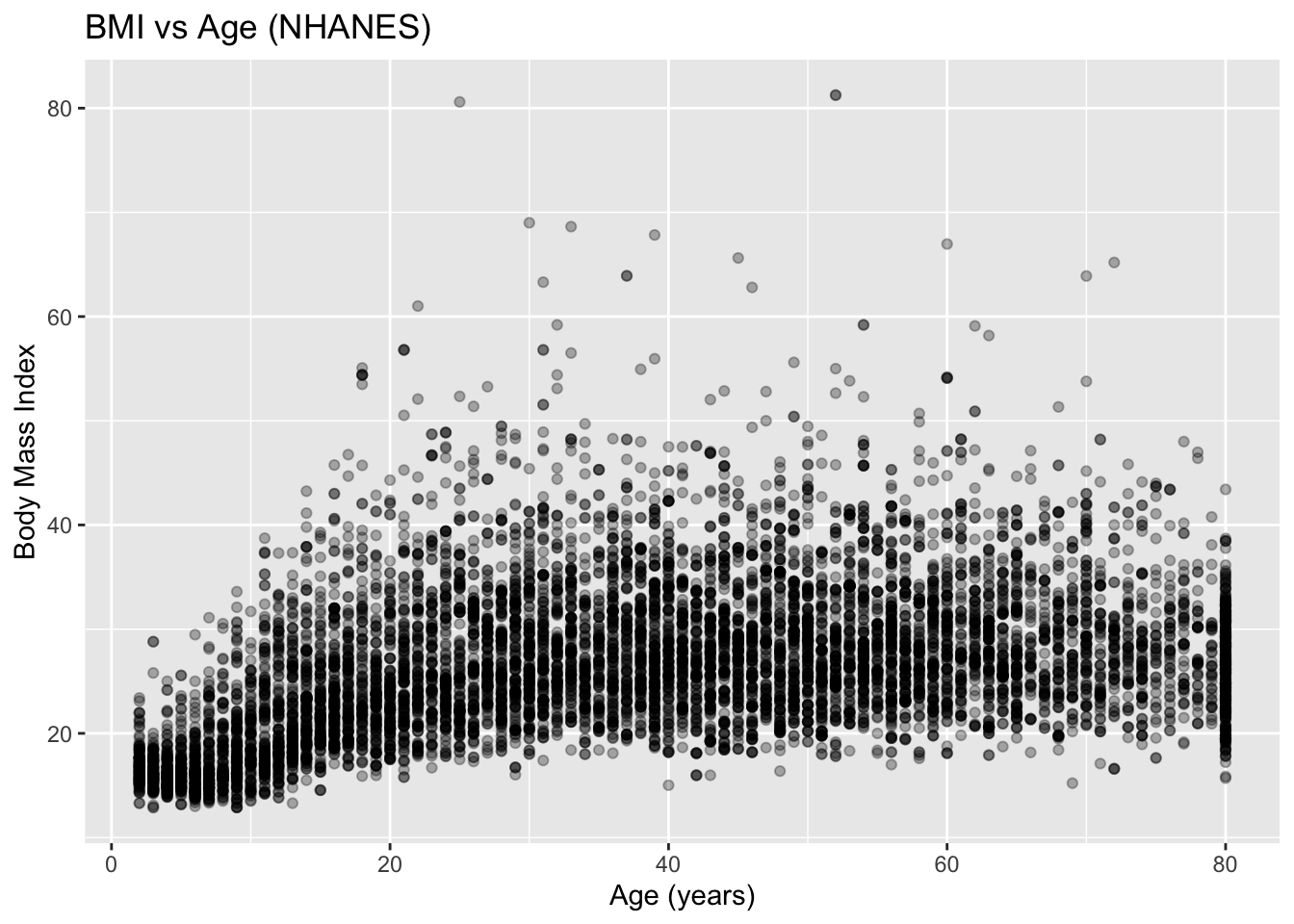
ggplot(df, 
       aes(
         x = Age, 
         y = BMI)
       ) +
  geom_point(
    alpha = 0.3
    ) +
  labs(
    title = "BMI vs Age (NHANES)",
    x = "Age (years)",
    y = "Body Mass Index"
  )

Try to interpret the graph using public health terms and using plain English.

Fit Simple Linear Regression

model <- lm(BMI ~ Age, data = df)
summary(model)

Call:
lm(formula = BMI ~ Age, data = df)

Residuals:
    Min      1Q  Median      3Q     Max 
-16.794  -4.803  -1.236   3.466  55.697 

Coefficients:
             Estimate Std. Error t value Pr(>|t|)    
(Intercept) 21.451688   0.137193  156.36   <2e-16 ***
Age          0.138033   0.003148   43.84   <2e-16 ***
---
Signif. codes:  0 '***' 0.001 '**' 0.01 '*' 0.05 '.' 0.1 ' ' 1

Residual standard error: 6.735 on 9632 degrees of freedom
Multiple R-squared:  0.1664,    Adjusted R-squared:  0.1663 
F-statistic:  1922 on 1 and 9632 DF,  p-value: < 2.2e-16

How would you interpret this table?

You are not expected to interpret everything in the regression output.

Instead, focus on one row only: the row corresponding to Age.

From that row, identify:

  • Estimate → the slope (average change in BMI per year of age)
  • p-value → evidence of an association
  • Direction → positive or negative relationship

Ignore the following for now:

  • R-squared
  • F-statistic
  • Interpretation of the intercept

Slope and Confidence Interval

slope <- coef(model)["Age"]
ci <- confint(model)["Age", ]

The slope represents the average change in BMI for a one-year increase in age.

Inline reporting (required)

Use inline R code to report results so that your document updates automatically if the model changes.

For each additional year of age, BMI changes by an average of 0.138 units (95% CI: 0.132 to 0.144.

How to interpret this sentence

This sentence communicates:

  • Direction of the association
  • Magnitude of the change
  • Uncertainty in the estimate

This describes an association, not causation.

Adding a Regression Line

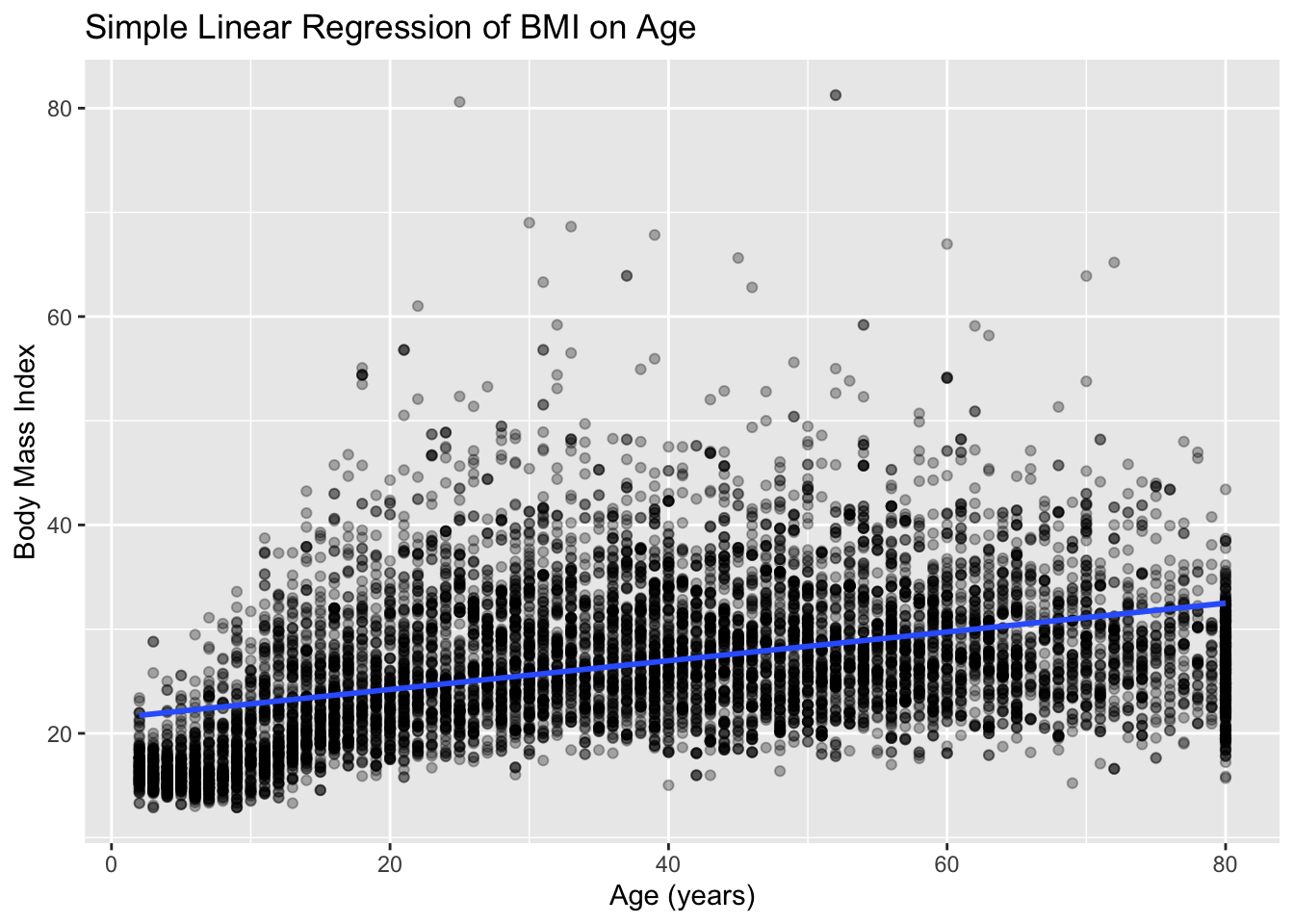
ggplot(df, aes(x = Age, y = BMI)) +
  geom_point(alpha = 0.3) +
  geom_smooth(method = "lm", se = TRUE) +
  labs(
    title = "Simple Linear Regression of BMI on Age",
    x = "Age (years)",
    y = "Body Mass Index"
  )
`geom_smooth()` using formula = 'y ~ x'

This plot combines:

  • the raw data (points), and
  • the model’s predicted average relationship (line).

The shaded band around the line represents the 95% confidence interval for the mean predicted BMI at each age.

You should focus on:

Direction of the line

  • Does the line slope upward or downward?
  • This should match the sign of the slope from the regression output.

How well the line summarizes the data

  • Do the points generally cluster around the line?
  • Or is there substantial scatter?

Uncertainty around the line

  • Is the confidence band narrow or wide?
  • Wider bands indicate more uncertainty in the estimated relationship.

Running Diagnostics

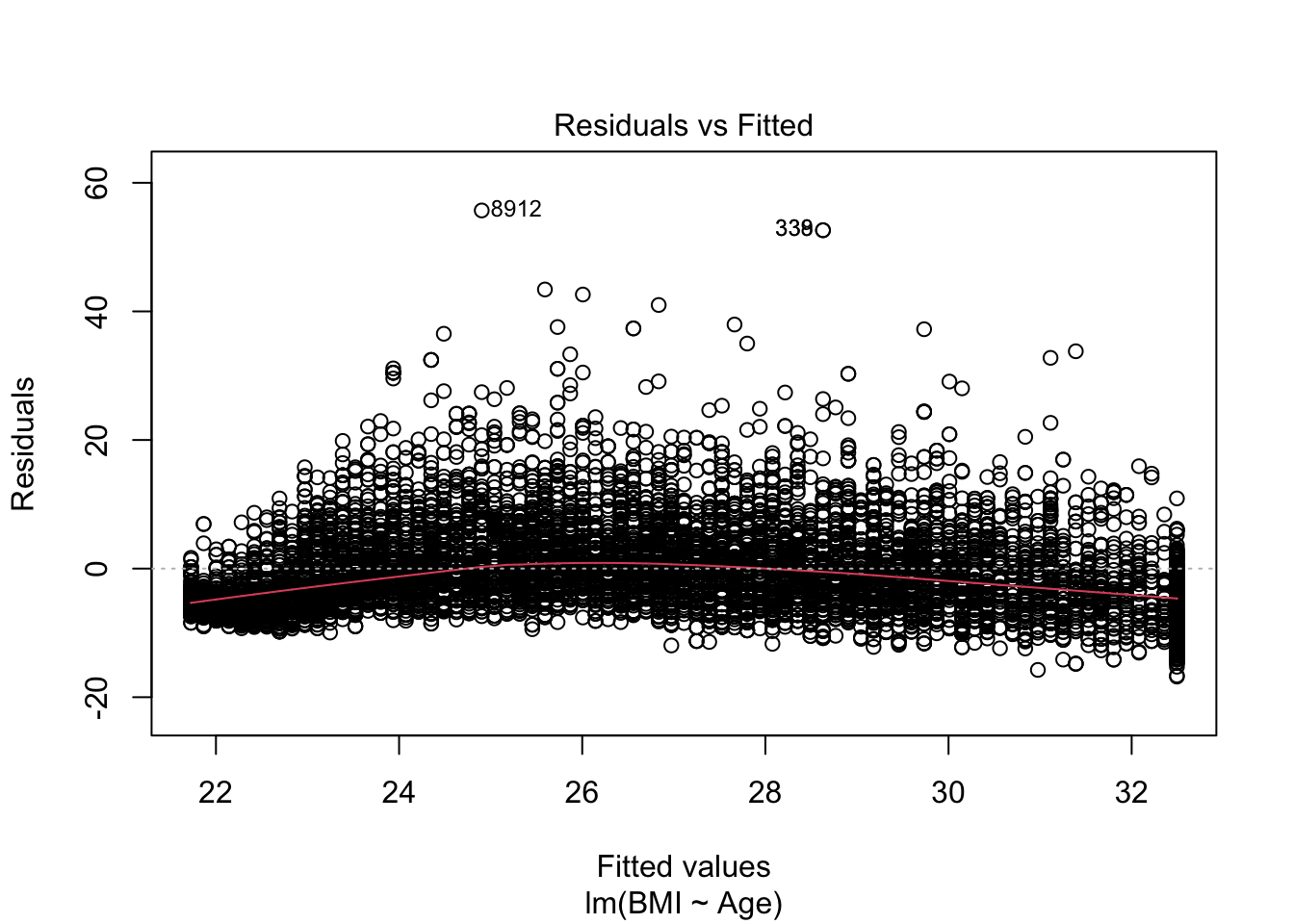
plot(model, which = 1)  # Residuals vs Fitted

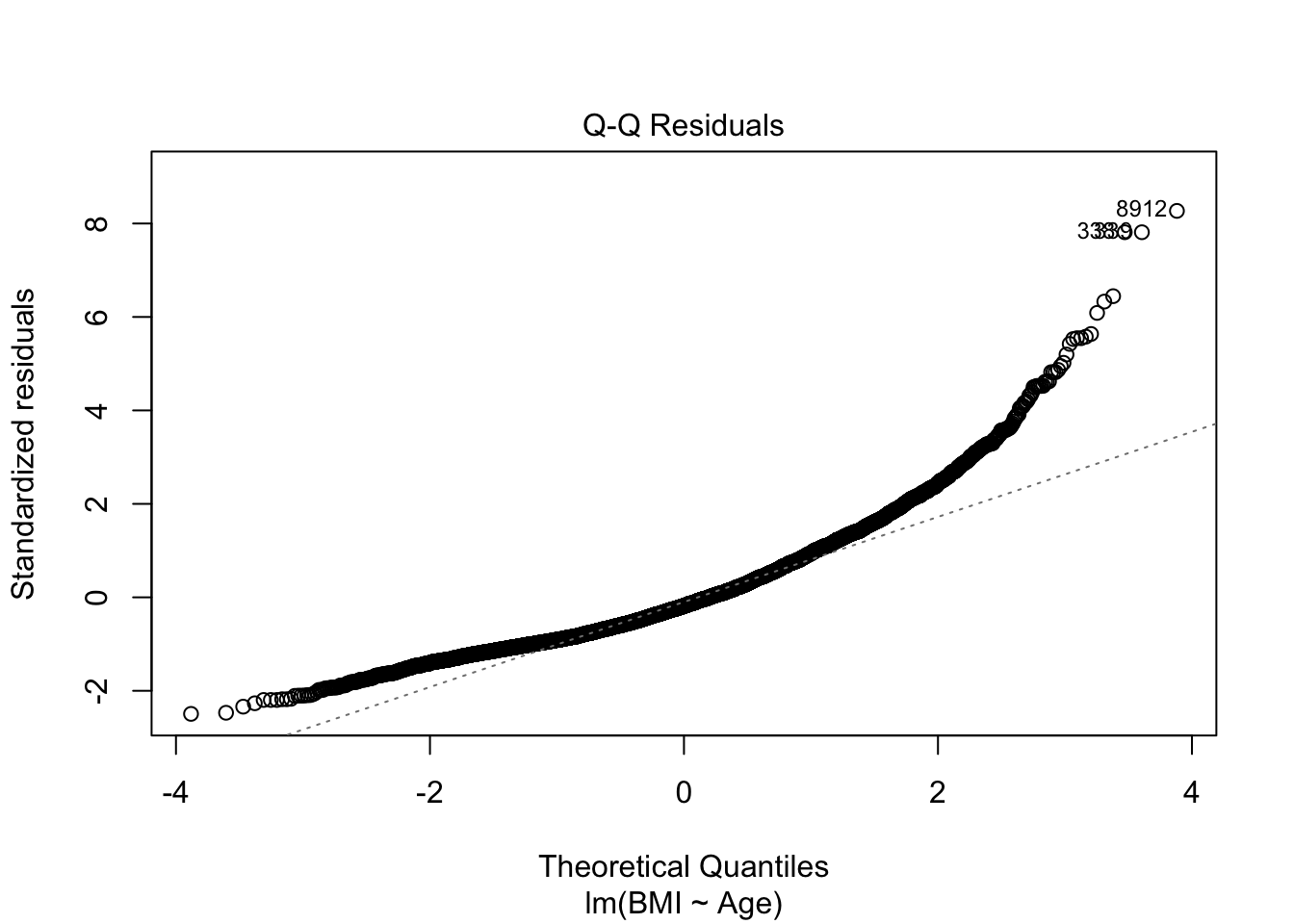
plot(model, which = 2)  # Normal Q-Q

These plots help assess whether the assumptions of linear regression are reasonably met.

You are expected to recognize obvious red flags.

Plot 1: Residuals vs. Fitted

This plot checks:

  • Linearity
  • Constant variability (homoscedasticity)

What YOU should look for:

  • Residuals scattered randomly around zero
  • No clear curve or pattern
  • Roughly equal spread across fitted values

Acceptable interpretation:

The residuals appear randomly scattered around zero with no strong curvature, suggesting the linearity assumption is reasonable. The spread of residuals is fairly consistent across fitted values, indicating approximately constant variance.

What would indicate a concern:

  • Curved pattern → possible nonlinearity
  • Funnel shape → non-constant variance

You should identify, not fix, these issues (at least not yet anyways).

Plot 2: Normasl Q-Q Plot

What this plot checks:

  • Approximate normality of residuals

This matters for:

  • confidence intervals
  • p-values

What YOU should look for:

  • Points falling roughly along the diagonal line
  • Small deviations at the ends are acceptable

Normality is about the residuals, not the outcome variable itself.

In this course, you are expected to describe diagnostic plots in words and identify major issues if present, not to diagnose or correct subtle statistical problems.