Lesson 8: Multiple Linear Regression

Purpose of this lesson

This lesson introduces multiple linear regression, which allows us to examine the association between a numeric outcome and multiple predictors at the same time. In public health, this is commonly used to estimate adjusted associations, meaning the association between a predictor and an outcome while holding other variables constant.

The focus today is interpretation: how to read output, how to write results in plain language, and how to avoid causal claims when the study design is observational.


Learning goals

By the end of this lesson, you will be able to:

  • Explain why multiple regression is used in public health
  • Fit a multiple linear regression model using lm()
  • Interpret an adjusted slope (“holding other variables constant”)
  • Interpret categorical predictors using a reference group
  • Compare a simple model vs an adjusted model
  • Report regression results using inline R code in Quarto

Setup

library(tidyverse)
Warning: package 'dplyr' was built under R version 4.5.1
── Attaching core tidyverse packages ──────────────────────── tidyverse 2.0.0 ──
✔ dplyr     1.2.0     ✔ readr     2.1.5
✔ forcats   1.0.0     ✔ stringr   1.5.1
✔ ggplot2   3.5.2     ✔ tibble    3.2.1
✔ lubridate 1.9.4     ✔ tidyr     1.3.1
✔ purrr     1.0.4     
── Conflicts ────────────────────────────────────────── tidyverse_conflicts() ──
✖ dplyr::filter() masks stats::filter()
✖ dplyr::lag()    masks stats::lag()
ℹ Use the conflicted package (<http://conflicted.r-lib.org/>) to force all conflicts to become errors
library(broom)
library(NHANES)

The Dataset

data("NHANES")
glimpse(NHANES)
Rows: 10,000
Columns: 76
$ ID               <int> 51624, 51624, 51624, 51625, 51630, 51638, 51646, 5164…
$ SurveyYr         <fct> 2009_10, 2009_10, 2009_10, 2009_10, 2009_10, 2009_10,…
$ Gender           <fct> male, male, male, male, female, male, male, female, f…
$ Age              <int> 34, 34, 34, 4, 49, 9, 8, 45, 45, 45, 66, 58, 54, 10, …
$ AgeDecade        <fct>  30-39,  30-39,  30-39,  0-9,  40-49,  0-9,  0-9,  40…
$ AgeMonths        <int> 409, 409, 409, 49, 596, 115, 101, 541, 541, 541, 795,…
$ Race1            <fct> White, White, White, Other, White, White, White, Whit…
$ Race3            <fct> NA, NA, NA, NA, NA, NA, NA, NA, NA, NA, NA, NA, NA, N…
$ Education        <fct> High School, High School, High School, NA, Some Colle…
$ MaritalStatus    <fct> Married, Married, Married, NA, LivePartner, NA, NA, M…
$ HHIncome         <fct> 25000-34999, 25000-34999, 25000-34999, 20000-24999, 3…
$ HHIncomeMid      <int> 30000, 30000, 30000, 22500, 40000, 87500, 60000, 8750…
$ Poverty          <dbl> 1.36, 1.36, 1.36, 1.07, 1.91, 1.84, 2.33, 5.00, 5.00,…
$ HomeRooms        <int> 6, 6, 6, 9, 5, 6, 7, 6, 6, 6, 5, 10, 6, 10, 10, 4, 3,…
$ HomeOwn          <fct> Own, Own, Own, Own, Rent, Rent, Own, Own, Own, Own, O…
$ Work             <fct> NotWorking, NotWorking, NotWorking, NA, NotWorking, N…
$ Weight           <dbl> 87.4, 87.4, 87.4, 17.0, 86.7, 29.8, 35.2, 75.7, 75.7,…
$ Length           <dbl> NA, NA, NA, NA, NA, NA, NA, NA, NA, NA, NA, NA, NA, N…
$ HeadCirc         <dbl> NA, NA, NA, NA, NA, NA, NA, NA, NA, NA, NA, NA, NA, N…
$ Height           <dbl> 164.7, 164.7, 164.7, 105.4, 168.4, 133.1, 130.6, 166.…
$ BMI              <dbl> 32.22, 32.22, 32.22, 15.30, 30.57, 16.82, 20.64, 27.2…
$ BMICatUnder20yrs <fct> NA, NA, NA, NA, NA, NA, NA, NA, NA, NA, NA, NA, NA, N…
$ BMI_WHO          <fct> 30.0_plus, 30.0_plus, 30.0_plus, 12.0_18.5, 30.0_plus…
$ Pulse            <int> 70, 70, 70, NA, 86, 82, 72, 62, 62, 62, 60, 62, 76, 8…
$ BPSysAve         <int> 113, 113, 113, NA, 112, 86, 107, 118, 118, 118, 111, …
$ BPDiaAve         <int> 85, 85, 85, NA, 75, 47, 37, 64, 64, 64, 63, 74, 85, 6…
$ BPSys1           <int> 114, 114, 114, NA, 118, 84, 114, 106, 106, 106, 124, …
$ BPDia1           <int> 88, 88, 88, NA, 82, 50, 46, 62, 62, 62, 64, 76, 86, 6…
$ BPSys2           <int> 114, 114, 114, NA, 108, 84, 108, 118, 118, 118, 108, …
$ BPDia2           <int> 88, 88, 88, NA, 74, 50, 36, 68, 68, 68, 62, 72, 88, 6…
$ BPSys3           <int> 112, 112, 112, NA, 116, 88, 106, 118, 118, 118, 114, …
$ BPDia3           <int> 82, 82, 82, NA, 76, 44, 38, 60, 60, 60, 64, 76, 82, 7…
$ Testosterone     <dbl> NA, NA, NA, NA, NA, NA, NA, NA, NA, NA, NA, NA, NA, N…
$ DirectChol       <dbl> 1.29, 1.29, 1.29, NA, 1.16, 1.34, 1.55, 2.12, 2.12, 2…
$ TotChol          <dbl> 3.49, 3.49, 3.49, NA, 6.70, 4.86, 4.09, 5.82, 5.82, 5…
$ UrineVol1        <int> 352, 352, 352, NA, 77, 123, 238, 106, 106, 106, 113, …
$ UrineFlow1       <dbl> NA, NA, NA, NA, 0.094, 1.538, 1.322, 1.116, 1.116, 1.…
$ UrineVol2        <int> NA, NA, NA, NA, NA, NA, NA, NA, NA, NA, NA, NA, NA, N…
$ UrineFlow2       <dbl> NA, NA, NA, NA, NA, NA, NA, NA, NA, NA, NA, NA, NA, N…
$ Diabetes         <fct> No, No, No, No, No, No, No, No, No, No, No, No, No, N…
$ DiabetesAge      <int> NA, NA, NA, NA, NA, NA, NA, NA, NA, NA, NA, NA, NA, N…
$ HealthGen        <fct> Good, Good, Good, NA, Good, NA, NA, Vgood, Vgood, Vgo…
$ DaysPhysHlthBad  <int> 0, 0, 0, NA, 0, NA, NA, 0, 0, 0, 10, 0, 4, NA, NA, 0,…
$ DaysMentHlthBad  <int> 15, 15, 15, NA, 10, NA, NA, 3, 3, 3, 0, 0, 0, NA, NA,…
$ LittleInterest   <fct> Most, Most, Most, NA, Several, NA, NA, None, None, No…
$ Depressed        <fct> Several, Several, Several, NA, Several, NA, NA, None,…
$ nPregnancies     <int> NA, NA, NA, NA, 2, NA, NA, 1, 1, 1, NA, NA, NA, NA, N…
$ nBabies          <int> NA, NA, NA, NA, 2, NA, NA, NA, NA, NA, NA, NA, NA, NA…
$ Age1stBaby       <int> NA, NA, NA, NA, 27, NA, NA, NA, NA, NA, NA, NA, NA, N…
$ SleepHrsNight    <int> 4, 4, 4, NA, 8, NA, NA, 8, 8, 8, 7, 5, 4, NA, 5, 7, N…
$ SleepTrouble     <fct> Yes, Yes, Yes, NA, Yes, NA, NA, No, No, No, No, No, Y…
$ PhysActive       <fct> No, No, No, NA, No, NA, NA, Yes, Yes, Yes, Yes, Yes, …
$ PhysActiveDays   <int> NA, NA, NA, NA, NA, NA, NA, 5, 5, 5, 7, 5, 1, NA, 2, …
$ TVHrsDay         <fct> NA, NA, NA, NA, NA, NA, NA, NA, NA, NA, NA, NA, NA, N…
$ CompHrsDay       <fct> NA, NA, NA, NA, NA, NA, NA, NA, NA, NA, NA, NA, NA, N…
$ TVHrsDayChild    <int> NA, NA, NA, 4, NA, 5, 1, NA, NA, NA, NA, NA, NA, 4, N…
$ CompHrsDayChild  <int> NA, NA, NA, 1, NA, 0, 6, NA, NA, NA, NA, NA, NA, 3, N…
$ Alcohol12PlusYr  <fct> Yes, Yes, Yes, NA, Yes, NA, NA, Yes, Yes, Yes, Yes, Y…
$ AlcoholDay       <int> NA, NA, NA, NA, 2, NA, NA, 3, 3, 3, 1, 2, 6, NA, NA, …
$ AlcoholYear      <int> 0, 0, 0, NA, 20, NA, NA, 52, 52, 52, 100, 104, 364, N…
$ SmokeNow         <fct> No, No, No, NA, Yes, NA, NA, NA, NA, NA, No, NA, NA, …
$ Smoke100         <fct> Yes, Yes, Yes, NA, Yes, NA, NA, No, No, No, Yes, No, …
$ Smoke100n        <fct> Smoker, Smoker, Smoker, NA, Smoker, NA, NA, Non-Smoke…
$ SmokeAge         <int> 18, 18, 18, NA, 38, NA, NA, NA, NA, NA, 13, NA, NA, N…
$ Marijuana        <fct> Yes, Yes, Yes, NA, Yes, NA, NA, Yes, Yes, Yes, NA, Ye…
$ AgeFirstMarij    <int> 17, 17, 17, NA, 18, NA, NA, 13, 13, 13, NA, 19, 15, N…
$ RegularMarij     <fct> No, No, No, NA, No, NA, NA, No, No, No, NA, Yes, Yes,…
$ AgeRegMarij      <int> NA, NA, NA, NA, NA, NA, NA, NA, NA, NA, NA, 20, 15, N…
$ HardDrugs        <fct> Yes, Yes, Yes, NA, Yes, NA, NA, No, No, No, No, Yes, …
$ SexEver          <fct> Yes, Yes, Yes, NA, Yes, NA, NA, Yes, Yes, Yes, Yes, Y…
$ SexAge           <int> 16, 16, 16, NA, 12, NA, NA, 13, 13, 13, 17, 22, 12, N…
$ SexNumPartnLife  <int> 8, 8, 8, NA, 10, NA, NA, 20, 20, 20, 15, 7, 100, NA, …
$ SexNumPartYear   <int> 1, 1, 1, NA, 1, NA, NA, 0, 0, 0, NA, 1, 1, NA, NA, 1,…
$ SameSex          <fct> No, No, No, NA, Yes, NA, NA, Yes, Yes, Yes, No, No, N…
$ SexOrientation   <fct> Heterosexual, Heterosexual, Heterosexual, NA, Heteros…
$ PregnantNow      <fct> NA, NA, NA, NA, NA, NA, NA, NA, NA, NA, NA, NA, NA, N…
Outcome and Predictors

For this lesson we will use:

  • Outcome (Y): BMI
  • Predictors (X):
    • Age (numeric)
    • Gender (categorical)
    • Race1 (categorical)

We will see how adding predictors changes interpretation.

Data Preparation

df <- NHANES %>%
  select(BMI, Age, Gender, Race1) %>%
  drop_na()

df %>% glimpse()
Rows: 9,634
Columns: 4
$ BMI    <dbl> 32.22, 32.22, 32.22, 15.30, 30.57, 16.82, 20.64, 27.24, 27.24, …
$ Age    <int> 34, 34, 34, 4, 49, 9, 8, 45, 45, 45, 66, 58, 54, 10, 58, 50, 9,…
$ Gender <fct> male, male, male, male, female, male, male, female, female, fem…
$ Race1  <fct> White, White, White, Other, White, White, White, White, White, …

Quick Checks

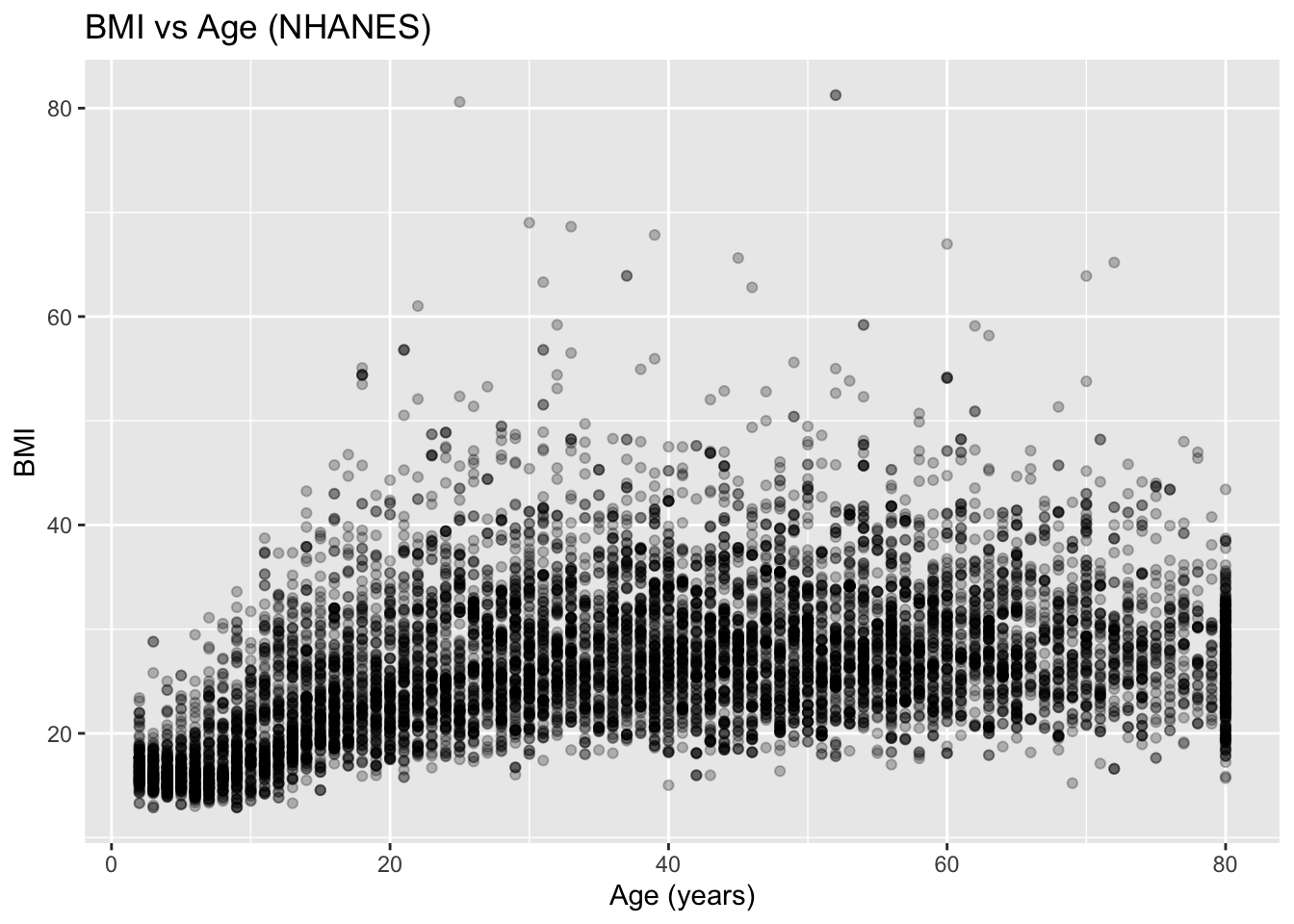
Scatterplot

scatter_df <- ggplot(df, 
                     aes(x = Age, 
                         y = BMI
                         )) +
  geom_point(alpha = 0.25) +
  labs(
    title = "BMI vs Age (NHANES)",
    x = "Age (years)",
    y = "BMI"
  )

scatter_df

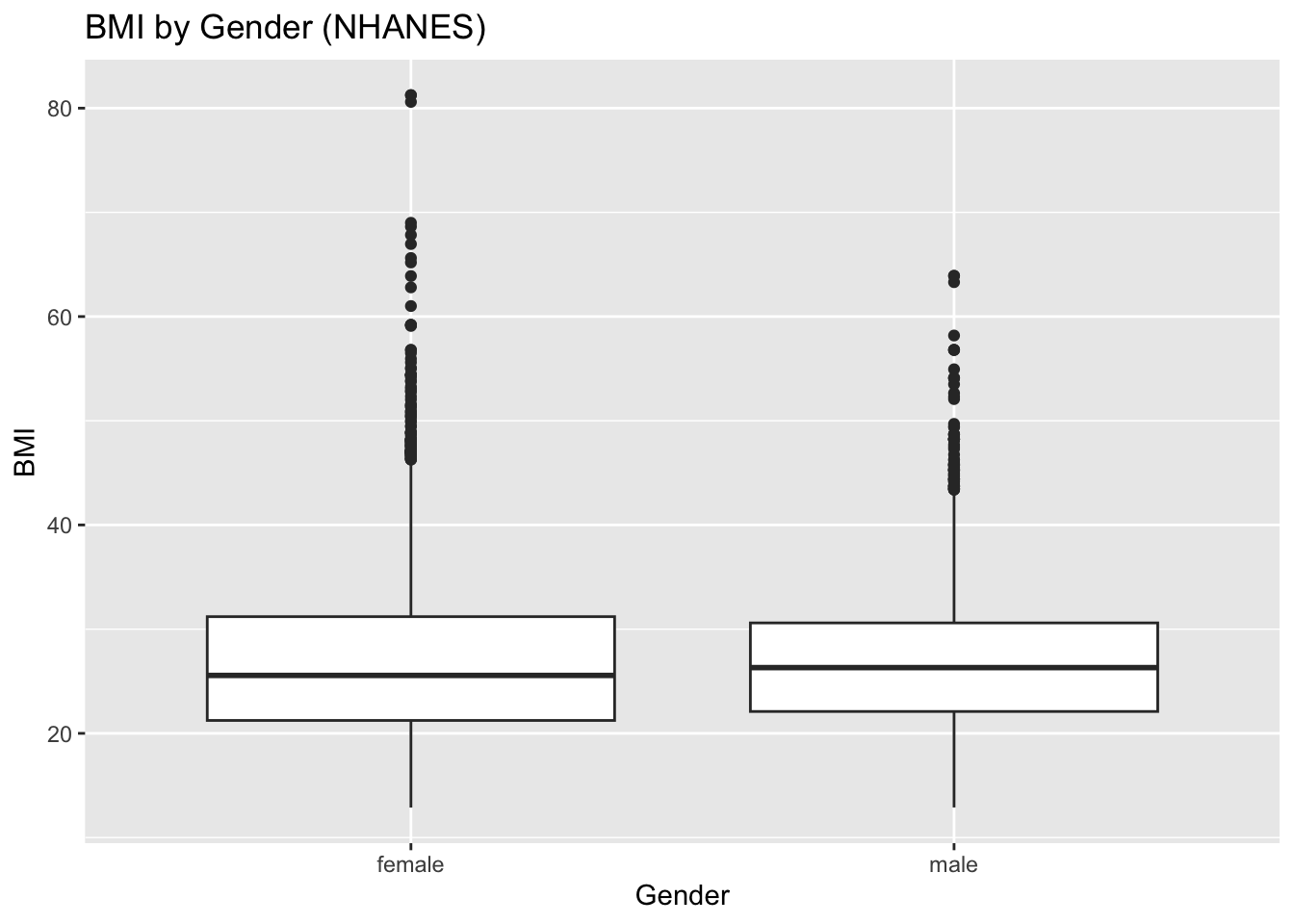
Group Comparison (BMI by Gender)

boxplot_df <- ggplot(df, 
                     aes(x = Gender, 
                         y = BMI
                         )) +
  geom_boxplot() +
  labs(
    title = "BMI by Gender (NHANES)",
    x = "Gender",
    y = "BMI"
  )

boxplot_df

Interpretations

What do you see?

Fit Simple Model

Let’s start with a simple regression of BMI on Age.

m1 <- lm(BMI ~ Age, data = df)
summary(m1)

Call:
lm(formula = BMI ~ Age, data = df)

Residuals:
    Min      1Q  Median      3Q     Max 
-16.794  -4.803  -1.236   3.466  55.697 

Coefficients:
             Estimate Std. Error t value Pr(>|t|)    
(Intercept) 21.451688   0.137193  156.36   <2e-16 ***
Age          0.138033   0.003148   43.84   <2e-16 ***
---
Signif. codes:  0 '***' 0.001 '**' 0.01 '*' 0.05 '.' 0.1 ' ' 1

Residual standard error: 6.735 on 9632 degrees of freedom
Multiple R-squared:  0.1664,    Adjusted R-squared:  0.1663 
F-statistic:  1922 on 1 and 9632 DF,  p-value: < 2.2e-16

Fit Multiple Regression Model

m2 <- lm (BMI ~ Age + Gender + Race1, data = df)
summary(m2)

Call:
lm(formula = BMI ~ Age + Gender + Race1, data = df)

Residuals:
    Min      1Q  Median      3Q     Max 
-18.650  -4.688  -1.171   3.338  56.126 

Coefficients:
               Estimate Std. Error t value Pr(>|t|)    
(Intercept)   23.145435   0.236101  98.032  < 2e-16 ***
Age            0.142054   0.003184  44.613  < 2e-16 ***
Gendermale     0.022571   0.136238   0.166    0.868    
Race1Hispanic -1.442547   0.337861  -4.270 1.98e-05 ***
Race1Mexican  -0.734311   0.292249  -2.513    0.012 *  
Race1White    -2.222557   0.214599 -10.357  < 2e-16 ***
Race1Other    -3.426551   0.309443 -11.073  < 2e-16 ***
---
Signif. codes:  0 '***' 0.001 '**' 0.01 '*' 0.05 '.' 0.1 ' ' 1

Residual standard error: 6.675 on 9627 degrees of freedom
Multiple R-squared:  0.1816,    Adjusted R-squared:  0.1811 
F-statistic:   356 on 6 and 9627 DF,  p-value: < 2.2e-16

Interpretations

You learned in Lesson 6 how to interpret the outputs for Simple Linear Regressions. Now, let’s learn how to interpret Multiple Regression Coefficients.

In multiple regressions:

  • The coefficient for Age is interpreted as the association between Age and BMI holding Gender and Race1 constant.
  • Coefficients for Gender and Race1 are interpreted as differences in mean BMI relative to a reference group, holding other variables constant.

What does constant mean in this case?

Identifying the Reference Groups

R will automatically choose a reference group for categorical variables (typically the first level alphabetically, unless re-leveled).

What is a reference group?

A reference group is the baseline categorical level omitted from the model, serving as a comparison point for dummy-coded predictors.

Interpretation: The intercept represents the average outcome for the reference group, and coefficients for other levels represent the average difference compared to the reference.

levels(df$Gender)
[1] "female" "male"  
levels(df$Race1)
[1] "Black"    "Hispanic" "Mexican"  "White"    "Other"   

If you want to set a specific reference group:

# Example only (do not run unless instructed):
refernece_df <- df %>%
   mutate(
     Gender = relevel(Gender, ref = "female"),
     Race1  = relevel(Race1, ref = "White")
   )

Extract Key Results

tidy_m2 <- tidy(m2, conf.int = TRUE)
tidy_m2
# A tibble: 7 × 7
  term          estimate std.error statistic  p.value conf.low conf.high
  <chr>            <dbl>     <dbl>     <dbl>    <dbl>    <dbl>     <dbl>
1 (Intercept)    23.1      0.236      98.0   0          22.7      23.6  
2 Age             0.142    0.00318    44.6   0           0.136     0.148
3 Gendermale      0.0226   0.136       0.166 8.68e- 1   -0.244     0.290
4 Race1Hispanic  -1.44     0.338      -4.27  1.98e- 5   -2.10     -0.780
5 Race1Mexican   -0.734    0.292      -2.51  1.20e- 2   -1.31     -0.161
6 Race1White     -2.22     0.215     -10.4   5.27e-25   -2.64     -1.80 
7 Race1Other     -3.43     0.309     -11.1   2.51e-28   -4.03     -2.82 
# The tidy function will convert messy outputs and turn them into a tidy tibble.

Extract the Age Coefficient and Confidence Interval

age_row <- tidy_m2 %>% filter(term == "Age")

age_slope <- age_row %>% pull(estimate)
age_lo <- age_row %>% pull(conf.low)
age_hi <- age_row %>% pull(conf.high)
age_p  <- age_row %>% pull(p.value)

Write the results using inline coding.

After adjusting for gender and race/ethnicity, BMI changed by an average of 0.142 units per one-year increase in age (95% CI: 0.136 to 0.148; p-value = 0).

Compare the Simple and Adjusted Models

tidy(m1, conf.int = TRUE) %>% filter(term == "Age")
# A tibble: 1 × 7
  term  estimate std.error statistic p.value conf.low conf.high
  <chr>    <dbl>     <dbl>     <dbl>   <dbl>    <dbl>     <dbl>
1 Age      0.138   0.00315      43.8       0    0.132     0.144
tidy(m2, conf.int = TRUE) %>% filter(term == "Age")
# A tibble: 1 × 7
  term  estimate std.error statistic p.value conf.low conf.high
  <chr>    <dbl>     <dbl>     <dbl>   <dbl>    <dbl>     <dbl>
1 Age      0.142   0.00318      44.6       0    0.136     0.148

Write your interpretation.

Make sure to answer the following:

  1. Did the Age coefficient change from m1 to m2?
  2. What might explain the change? Any confounders?
  3. How does “adjusted interpretation differ from the simple model interpretation?

Interpret Categorical Predictors

Use the following code to help you pick a categorical predictor from m2.

# tidy_m2 %>% filter(str_detect(term, "Gender|Race1"))

Write your interpretation.